Terraform module for building base networking in AWS
A Terraform module for building a base network in AWS.
The network consists of:
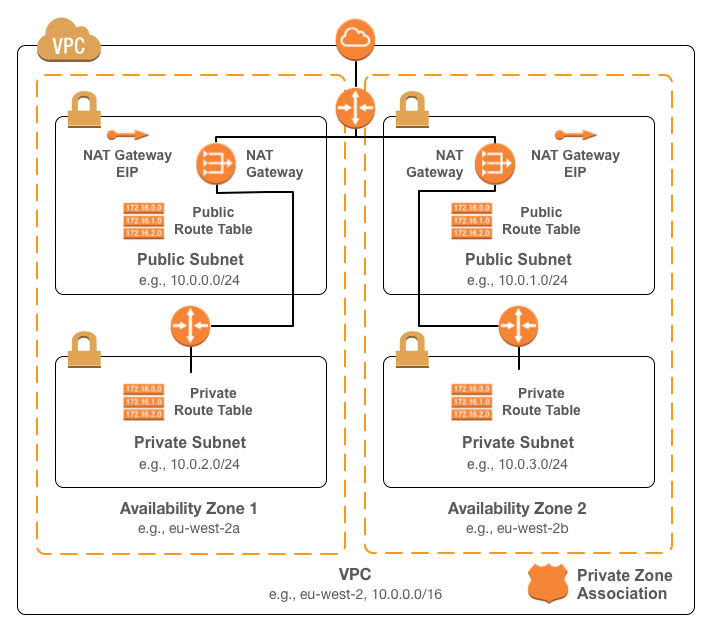
To use the module, include something like the following in your Terraform
configuration:
module "base-network" {source = "infrablocks/base-networking/aws"version = "4.0.0"vpc_cidr = "10.0.0.0/16"region = "eu-west-2"availability_zones = ["eu-west-2a", "eu-west-2b"]component = "important-component"deployment_identifier = "production"private_zone_id = "Z3CVA9QD5NHSW3"}
See the
Terraform registry entry
for more details.
| Name | Description | Default | Required |
|---|---|---|---|
vpc_cidr |
The CIDR to use for the VPC. | - | Yes |
region |
The region into which to deploy the VPC. | - | Yes |
availability_zones |
The availability zones for which to add subnets. | - | Yes |
public_subnets_offset |
The number of /24s to offset the public subnets in the VPC CIDR. | 0 |
No |
private_subnets_offset |
The number of /24s to offset the private subnets in the VPC CIDR. | 0 |
No |
component |
The component this network will contain. | - | Yes |
deployment_identifier |
An identifier for this instantiation. | - | Yes |
dependencies |
A comma separated list of components depended on my this component. | [] |
No |
include_route53_zone_association |
Whether or not to associate VPC with the private Route 53 zone ("yes" or "no"). |
"yes" |
No |
private_zone_id |
The ID of the private Route 53 zone` | - | If include_route53_zone_association is "yes" |
include_nat_gateways |
Whether or not to deploy NAT gateways for outbound Internet connectivity ("yes" or "no"). |
"yes" |
No |
| Name | Description |
|---|---|
vpc_id |
The ID of the created VPC. |
vpc_cidr |
The CIDR of the created VPC. |
availability_zones |
The availability zones in which subnets were created. |
number_of_availability_zones |
The number of populated availability zones available. |
public_subnet_ids |
The IDs of the public subnets. |
public_subnet_cidrs |
The CIDRs of the public subnets. |
public_route_table_ids |
The IDs of the public route tables. |
private_subnet_ids |
The IDs of the private subnets. |
private_subnet_cidrs |
The CIDRs of the private subnets. |
private_route_table_ids |
The IDs of the private route tables. |
nat_public_ips |
The EIPs attached to the NAT gateways. |
internet_gateway_id |
The ID of the created IGW. |
This module is compatible with Terraform versions greater than or equal to
Terraform 1.0 and Terraform AWS provider versions greater than or equal to 3.27.
In order for the build to run correctly, a few tools will need to be installed
on your development machine:
Installing the required tools is best managed by homebrew.
To install homebrew:
ruby -e "$(curl -fsSL https://raw.githubusercontent.com/Homebrew/install/master/install)"
Then, to install the required tools:
# rubybrew install rbenvbrew install ruby-buildecho 'eval "$(rbenv init - bash)"' >> ~/.bash_profileecho 'eval "$(rbenv init - zsh)"' >> ~/.zshrceval "$(rbenv init -)"rbenv install 3.1.1rbenv rehashrbenv local 3.1.1gem install bundler# git, git-crypt, gnupgbrew install gitbrew install git-cryptbrew install gnupg# aws-vaultbrew cask install# direnvbrew install direnvecho "$(direnv hook bash)" >> ~/.bash_profileecho "$(direnv hook zsh)" >> ~/.zshrceval "$(direnv hook $SHELL)"direnv allow <repository-directory>
Running the build requires an AWS account and AWS credentials. You are free to
configure credentials however you like as long as an access key ID and secret
access key are available. These instructions utilise
aws-vault which makes credential
management easy and secure.
To run the full build, including unit and integration tests, execute:
aws-vault exec <profile> -- ./go
To run the unit tests, execute:
aws-vault exec <profile> -- ./go test:unit
To run the integration tests, execute:
aws-vault exec <profile> -- ./go test:integration
To provision the module prerequisites:
aws-vault exec <profile> -- ./go deployment:prerequisites:provision[<deployment_identifier>]
To provision the module contents:
aws-vault exec <profile> -- ./go deployment:root:provision[<deployment_identifier>]
To destroy the module contents:
aws-vault exec <profile> -- ./go deployment:root:destroy[<deployment_identifier>]
To destroy the module prerequisites:
aws-vault exec <profile> -- ./go deployment:prerequisites:destroy[<deployment_identifier>]
Configuration parameters can be overridden via environment variables. For
example, to run the unit tests with a seed of "testing", execute:
SEED=testing aws-vault exec <profile> -- ./go test:unit
When a seed is provided via an environment variable, infrastructure will not be
destroyed at the end of test execution. This can be useful during development
to avoid lengthy provision and destroy cycles.
To subsequently destroy unit test infrastructure for a given seed:
FORCE_DESTROY=yes SEED=testing aws-vault exec <profile> -- ./go test:unit
To generate an SSH key pair:
ssh-keygen -m PEM -t rsa -b 4096 -C integration-test@example.com -N '' -f config/secrets/keys/bastion/ssh
To generate a self signed certificate:
openssl req -x509 -newkey rsa:4096 -keyout key.pem -out cert.pem -days 365
To decrypt the resulting key:
openssl rsa -in key.pem -out ssl.key
To encrypt a GPG key for use by CircleCI:
openssl aes-256-cbc \-e \-md sha1 \-in ./config/secrets/ci/gpg.private \-out ./.circleci/gpg.private.enc \-k "<passphrase>"
To check decryption is working correctly:
openssl aes-256-cbc \-d \-md sha1 \-in ./.circleci/gpg.private.enc \-k "<passphrase>"
Bug reports and pull requests are welcome on GitHub at
https://github.com/infrablocks/terraform-aws-base-networking. This project is
intended to be a safe, welcoming space for collaboration, and contributors are
expected to adhere to the
Contributor Covenant code of conduct.
The library is available as open source under the terms of the
MIT License.



